Play a phrase. Get a riser.
Revok catches a phrase from your track and turns it into a reverse-reverb swell that lands exactly on the next beat. Then you drag it into your DAW.
Free VST3 plugin for Windows, 64-bit. Mac version coming.
How it works
By hand this takes eight steps: bounce, reverse, add reverb, bounce, reverse back, trim, de-ess and drag. Revok runs the whole chain in the background as soon as you stop playing. Press play on each step.
The plugin
The riser on top, six controls below. Every move re-renders it in the background, so you hear the change straight away.
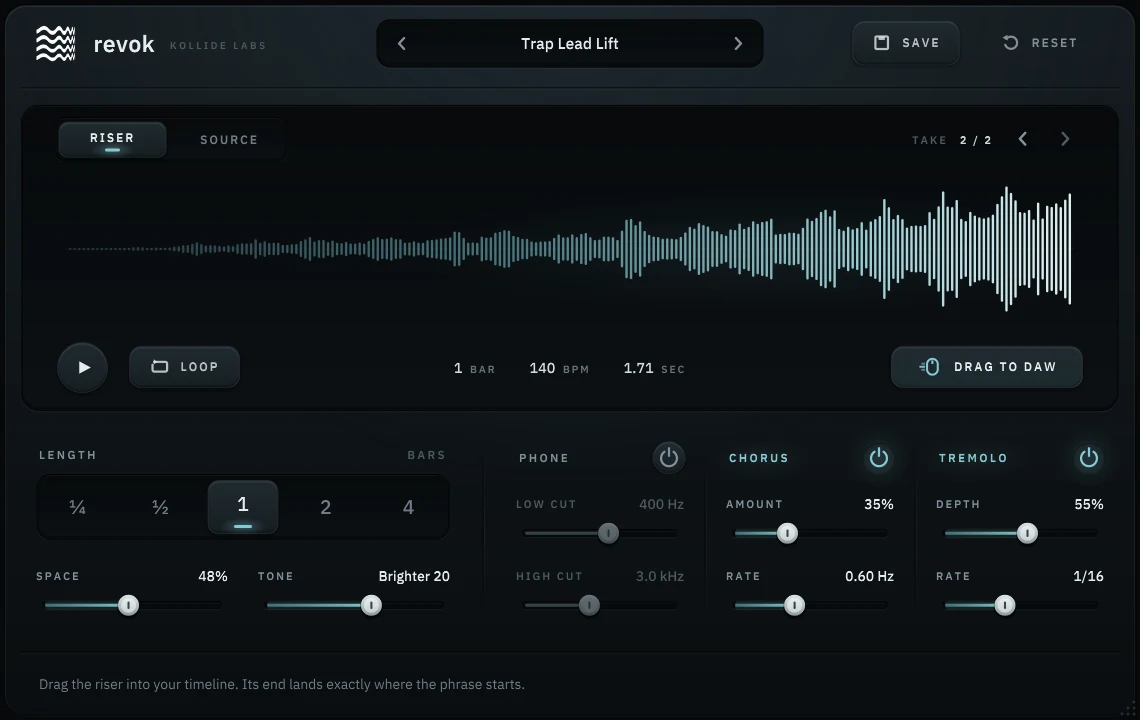
Length
¼ to 4 bars, locked to your project’s tempo and time signature.
Space
How big and how long the swell is.
Tone
Tilts the riser darker or brighter.
Phone
A band-passed, lo-fi take with its own low and high cut.
Chorus
Width and slow movement.
Tremolo
Rhythmic chops from ¼ down to 1/32, triplets included.
Drag to DAW
Drops the riser on any track as a WAV, already in time.
Details
- Capture
- Always on. Keeps the last 20 seconds and catches phrases up to 8 seconds long. No record button.
- Takes
- Your last 16 captures, one click apart.
- Source view
- Drag start and end markers to pick the exact word or hit.
- Export
- A copy of every riser goes to Documents\Kollide Labs\Revok Exports.
- Presets
- 17 factory presets in Essentials, Lo-fi, Rhythmic and Atmosphere. Save your own beside them.
- Recall
- The capture and the riser are saved with your project.
- Window
- Resizable from 570 × 360 to 1520 × 960, sharp at any size.
- Formats
- VST3, Windows 64-bit. No AU, AAX or CLAP yet. Mac is next.
- Version
- 1.0.0
$0forever
Revok is free.
Make a Kollide Account, check out at $0 and download the installer. No card, no trial, nothing to unlock later. The same account works for Konsol and noteframe.
Want to tip?
Revok stays free for everyone. If it made a track better, you can leave any amount. It goes straight into making the next plugin.
Questions
Which DAWs does it work in?
Any 64-bit Windows DAW that loads VST3 plugins. Pro Tools and Logic aren’t supported.
Is there a Mac version?
Not yet. Revok is Windows only today. Create your free account and the Mac download will appear in your library the day it’s ready.
Windows warned me about the installer.
The installer isn’t code-signed yet, so SmartScreen may warn you. Choose More info, then Run anyway, or download the zip and copy the plugin files yourself.
What sounds work best?
Short phrases: a vocal word, a snare, a chord stab, a pluck. Revok trims the silence for you.
Is it really free?
Yes. No card, no trial period and no watermark.